
How to use Synthetic Twins
Synthetic Twins is a respondent source that generates synthetic respondents trained on responses from an existing survey. Use Synthetic Twins to extend learning from prior research without launching a new live sample.
Synthetic Twins does not replace real respondents. It extrapolates patterns from your own historical survey data to support faster exploration, iteration, and planning.
Where you’ll see it
Synthetic Twins appears as a Respondent Source option alongside Panel, First Party Data, and External Providers.
Requirements
Synthetic Twins is available only when it is enabled in your subscription and the projects for the survey you want to train the twins on and the project you want to use the twins in.
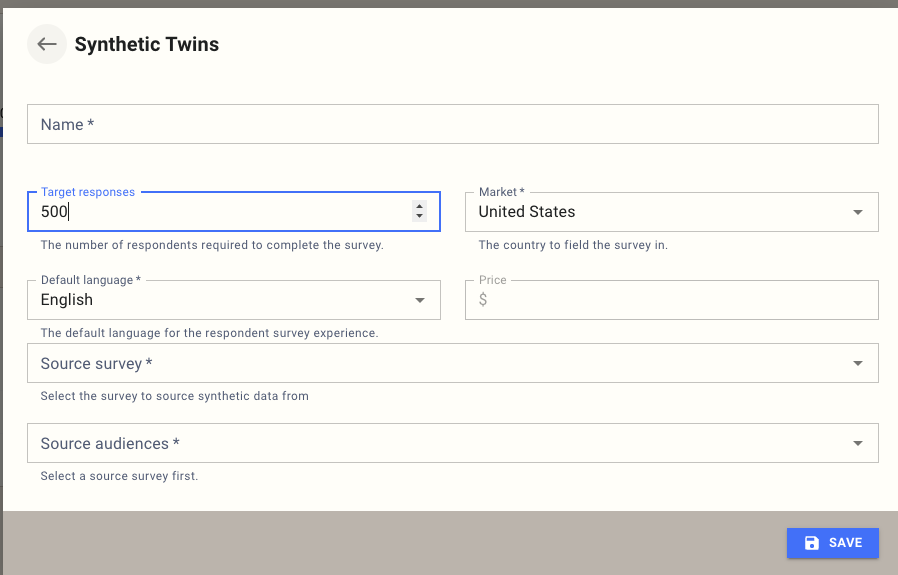
Add Synthetic Twins to a survey
Open the survey and navigate to Respondent Sources.
Select Add Respondent Source.
Choose Synthetic Twins.
Select a Source survey.
Select one or more Source audiences.
Select Save.
Notes:
A Source survey must be selected before Source audiences are available.
Source audiences are limited to audiences defined in the selected Source survey.
Common use cases
Synthetic Twins are designed to accelerate research workflows where speed, flexibility, or scale is constrained by fieldwork.
Early-stage concept triage
Use Synthetic Twins to explore early concepts, framings, or question structures before committing budget to live fieldwork. This is useful when narrowing large idea sets, testing directional logic, or identifying clearly weak options. Outputs are directional and intended to support prioritization, not final decisions.
Exploring unfieldable survey designs
Some survey designs are too complex or fatiguing to field with human respondents, such as large attribute grids, early-stage conjoint structures, or exhaustive feature permutations. Synthetic Twins allows you to explore these spaces, identify promising regions, and bring only viable designs into live testing.
Maintaining continuity in tracking studies
When trackers evolve, and new questions are introduced, historical comparisons can break. Synthetic Twins can be used to estimate missing variables, backfill historical waves, or model transitions between questionnaire versions. This supports continuity and expectation-setting but does not replace real measurement.
Mapping research outputs to activation systems
Survey data often uses constructs that do not align directly with CDPs, DSPs, or media taxonomies. Synthetic Twins can model activation-ready attributes from existing survey structures, enabling research-driven segments or mappings without re-fielding.
Reporting
Synthetic Twins responses are included in the Synthetic dataset. In reporting, these datasets are labeled SYNTHETIC DATA and are visually distinguished from human data.
Billing and pricing
There is no additional cost for fielding a survey with synthetic twins.
Limitations and guardrails
Synthetic Twins extrapolates patterns from existing data. It does not measure incidence, model rare behaviours, capture emotional nuance, or replace cultural or experiential insight. Synthetic data should not be used in isolation for high-stakes decisions without validation.
All synthetic outputs are clearly marked in charts and tables, and synthetic data is never rendered as equivalent to human responses.
FAQ
Why can’t I select Synthetic Twins?
Synthetic Twins is not enabled for your subscription, your project, or the Source survey’s project. An administrator must enable Allow Synthetic Respondents in the relevant settings.
What is a Source survey?
The survey whose responses are used to train synthetic twins.
What are Source audiences?
Audiences from the Source survey that are used to seed synthetic respondents. Multiple audiences can be selected.